Smoky Burger: A Bold Display Font for Web Design
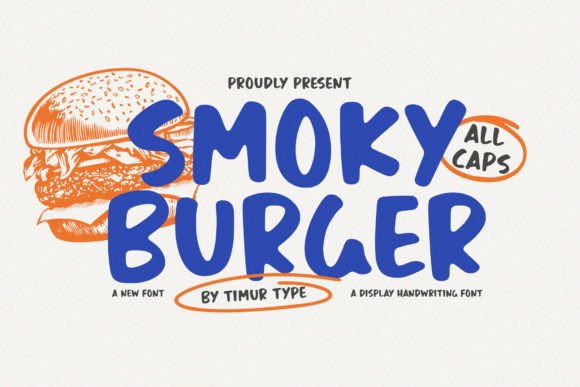
I was working on a redesign for a boutique online store, and I needed something that would stand out in the hero section. That’s when I discovered Smoky Burger. As a display font, it immediately caught my eye with its handcrafted feel and dynamic letterforms. It wasn’t just another bold typeface—it had character, like someone scribbled it with a pen and then added a little flair.
Smoky Burger is a display font that brings a sense of warmth and creativity to any digital space. Its playful curves and slightly irregular shapes give it an inviting, handwritten quality that feels both modern and personal. This kind of personality is perfect for websites that want to convey a brand identity rooted in authenticity and charm.
Testing Smoky Burger in Real Web Layouts
I first tested Smoky Burger as the headline for the hero section of the boutique site. The background was a soft gradient, and I placed the text over it with a subtle drop shadow to make it pop. The result? It felt like a warm welcome from the brand itself. The font didn’t overpower the design; instead, it complemented the overall aesthetic.
Next, I used it for a call-to-action button. At first, I worried the decorative nature of the font might make it hard to read on small buttons, but after adjusting the size and contrast, it worked beautifully. The button stood out without being distracting, which is key for user engagement.
I also experimented with using Smoky Burger in a blog header. Paired with a clean sans serif font for the body copy, the contrast was striking. The decorative headline drew attention, while the simple body text ensured readability. This kind of font pairing is essential for maintaining visual balance and hierarchy in web design.
Where Smoky Burger Shines in Digital Projects
Smoky Burger excels in situations where you want to add personality without sacrificing clarity. Here are some real-world examples of how it can be used effectively:
- Hero Sections: Use it for large headlines that need to grab attention quickly.
- Product Landing Pages: Highlight product names or taglines with this expressive font to create a memorable first impression.
- Coaching Websites: Add a touch of warmth and approachability to your branding.
- Campaign Pages: Use it for promotional banners or headlines to evoke emotion and curiosity.
- Portfolio Sites: Showcase your work with a creative, engaging title that reflects your unique style.
However, there are limitations to consider. Smoky Burger isn’t ideal for long paragraphs or dense blocks of text. Its decorative nature makes it more suitable for short phrases, headings, and accents rather than body copy. For instance, I wouldn’t use it for navigation menus or form labels where readability is critical.
Responsive Design and Readability Tips
When designing for mobile screens, I found that Smoky Burger still performed well if scaled appropriately. I made sure to test it across different screen sizes and resolutions to ensure it remained legible. On smaller screens, I reduced the font size slightly and increased the contrast against the background to maintain clarity.
For dark backgrounds, I used a light-colored text with a slight stroke to help it stand out. On light backgrounds, I opted for darker tones to ensure visibility. These small adjustments made a big difference in usability and aesthetics.
Another consideration is file formats. I checked that the font supports webfonts and that it includes all necessary weights and alternates. Since the website will be used commercially, I also made sure the licensing allowed for online use across multiple devices and platforms.
Font Pairing and Brand Consistency
To maintain a cohesive look, I paired Smoky Burger with a simple sans serif font for the body text. This combination created a nice contrast between the decorative headline and the clean, easy-to-read content. It helped reinforce the brand’s identity without overwhelming the user.
If the brand has a more editorial tone, I could see using a serif font alongside Smoky Burger for a classic yet creative feel. The key is to find a balance that supports the brand’s message while keeping the design visually appealing.
In conclusion, Smoky Burger is a versatile and expressive display font that adds character to any web project. Whether you’re designing a landing page, a portfolio, or an online store, this font can elevate your design with its handcrafted charm and dynamic appeal. Just remember to use it wisely—where it enhances the experience, not hinders it.